
C-19-101 Send Paperwork for Signature via SignNow
👤 RESPONSIBLE POSITION
Medical Records Specialist
🎯 PURPOSE
Clients occasionally have a Power of Attorney (POA) that signs all paperwork for the client. This paperwork includes: the Start of Care Packet which is obtained by the clinician at the Start of Care visit, ongoing documents such as Service Agreements, and sometimes the Notice of Medicare Non-Coverage at the end of services with Adara. This process outlines the steps that the Medical Record Specialist will take to get any paperwork to the POA via SignNow.
🔄 PROCESS
-
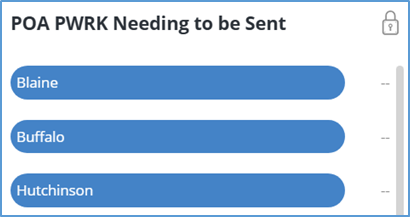
In Mosai, documents that need to be sent to the POA for signature will appear on the POA PWRK Needing to be Sent card within the various branch buckets. When document(s) populate in the buckets, select the bucket to view the list of cases within the bucket.
-
Select the View icon to the attachment.
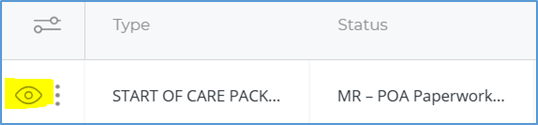
- Download and print (save to PDF when using the print icon) the admission paperwork, selecting the POA Paperwork folder and branch to which the paperwork belongs.
- Folder: 001-Corporate > Medical Records > POA Paperwork
- Document name format: Paperwork Name/Type- Initials of the client
-
A few examples of the paperwork name/type would be Admission Paperwork, Service Agreement, or NOMNC.

Be certain to follow the name format above as this will populate on the email to the POA.
- Open up the client’s chart in HCHB and locate the POA email address. Copy and paste the email address for later use.
- To locate this, open up coordination notes in the client’s chart and find the cord note named POA/Legal Representative. The email for POA will be located in the note details.
-
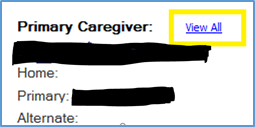
If it is not in the POA/Legal Representative cord note, take note of the name of the POA and go back to the patient snapshot card. Click view all under the primary caregiver tab.
-
This tab will display all caregivers associated with the client. Find the name of the POA and select it, then select the Edit Contact button. This will allow you to copy and paste the email address associated with the POA.

- If the email address is missing in both locations, reach out to the branch Business Manager (or designee) and Area Manager.
- Log into SignNow.
-
On the left-hand side toolbar, locate and select the branch to which the document belongs (click once so that it is highlighted); then select Create.
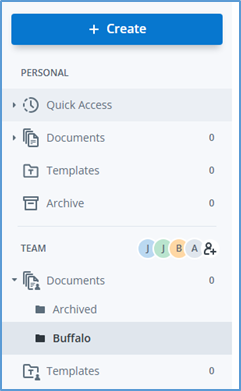
- From the dropdown, select Document and then Upload. Within the pop-up window, locate and upload the POA paperwork which was just saved in the MRS folder.
If you forget the step of selecting the branch location in step 8, you can later move your document after it has been sent out. In that case, once it has been sent out, click on the three dots on the right-hand side. Click Move and select the folder/branch to which the paperwork belongs.
-
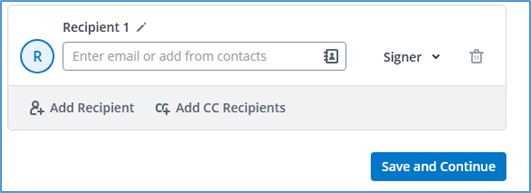
Once uploaded, click on the recipient tab and paste the email address which was copied from the POA/Legal Representative coordination note. Select Save and Continue.
- Scroll through the document and add the fields for signature, date, and initials where required.
- For the admission paperwork, there are 10-12 fields in total:
- Page 1: Legal Representative Signature and date
- Page 2: Legal Representative Signature and date
- Page 4: Initials on line by Unsecured Text/Email Communication Risk
- Page 5: Initials on line by Medicare
- Page 6: Legal Representative Signature and date
- Page 7: Legal Representative Signature and date
- Page 8 (when included and not marked as N/A): Signature and date
- Notice of Medicare Non-Coverage (NOMNC) & Service Agreements will have two fields (signature and date).
- For the admission paperwork, there are 10-12 fields in total:
- When all fields are completed, click Continue in the upper right-hand corner.
-
Change the Invite Theme to the specific branch location name.

- Select Send Invite. This step sends the email to the POA so that they are able to sign.
- Returning to Mosai, view the POA paperwork which was just sent to the POA and change the document’s status to MR- POA Paperwork Pending Signature.
- The Medical Records Specialist will monitor the status of the paperwork. If the paperwork is not back signed within two business days, the Medical Records Specialist must reach out to the Business Manager (or designee) and Area Manager at the branch who will call the POA. After the first two business days, the Medical Records Specialist will reach back out to the branch every two business days that the paperwork remains unsigned.
📅 Effective: 09.03.2025 | 🛠️ Revised: 08.07.2026 | ✅ Approved by: JFJ