
C-19-104 Add Branch to Existing Physician
👤 RESPONSIBLE POSITION | ROLE
Medical Records Specialist
🎯 PURPOSE
Occasionally the Medical Records Specialist will receive a request for a branch to be given access to a provider who has already been set up in HCHB. In these cases, that branch location must be added to that provider. This allows that branch to select that provider for clients belonging to their branch location.
🔄 PROCESS
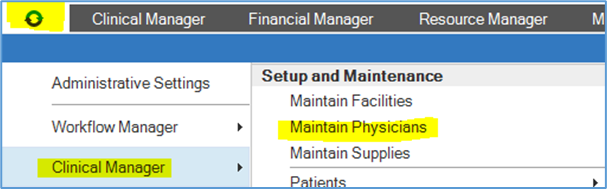
- Navigate to the Orb in the upper left of the HCHB Main page.
- Select Clinical Manager.
-
Select Maintain Physicians. A new HCHB window will open.
-
Select Show All Physicians.

-
Search for the provider who needs to be updated.

-
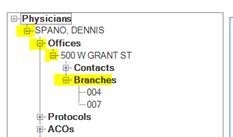
If physician listed, find them on the list along the left side. Select the + icons beside Physician Name, Offices, Address, then Branches:
-
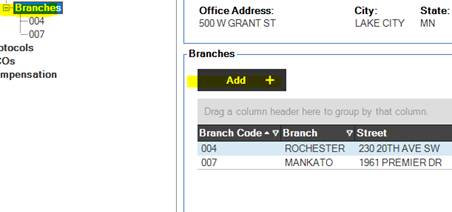
With Branches selected, select Add.
-
Select the Branch code from drop down; then click Save & Close.

- This completes adding the additional branch to the provider; that branch will now be able to select that provider for clients belonging to that branch location.
📅 Effective: 07.31.2026 | 🛠️ Revised: N/A | ✅ Approved: JFJ