
C-11-380 Orders Management: Update Provider on Signed Physician Order (Non-485)
This process is not to be used for Provider changes on a 485/POC (Plan of Care).
Refer to C-11-310 Orders Management- 485/POC Provider Follow Up and Escalation Process and C-11-350 Update Provider on Signed 485/POC for changes needed to 485’s.
👤 ROLE
Medical Records Specialist
🎯 PURPOSE
Identifies the steps required for the Medical Record Specialist to update a Provider (Physician/Non-Physician Practitioner) in HCHB if a physician order (non-485) is signed by a different provider. A different provider may sign if they are authorized to care for the client in the certifying provider’s absence.
🔄 PROCESS
Physician Orders in HCHB are defined by different Order Types. Available order types include the following:
| Add On Discipline | Emergent PRN Order | Plan of Care Update |
| Certification Period Adjustment Order | Hospital Hold | Resumption of Care |
| Discipline Discharge | Follow Up (SCIC) | Schedule ROC Visit |
| Discharge From Agency | Physician Order |
|
The order type is printed on the order as in these examples below:


The Medical Record Specialist will complete the following steps:
- Add the signing provider to Client Referral/Medical Record as a secondary provider. To do this, complete the following:
- NOTE: If a provider is already in the client’s provider list for that episode, the provider does not need to be added again.
-
Open the client's chart from Clinical Input.

-
Select the Physicians tab:

Select Add Physician.

-
Enter provider last name or select magnifying glass to search.

- If Provider is not available in list, initiate steps to verify and enter provider into HCHB.
- Select Save and Close to close referral and initiate PECOS Validation.
-
After selecting Save and Close, if no alert generates, the changes will save and the provider will be listed as a secondary provider.
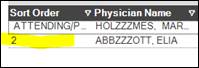


Note: If there is PECOS alert, it will generate upon selecting Save and Close.
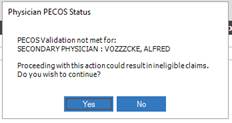
PECOS Validation issues MUST be addressed for clients who has a Medicare or Medicare Advantage payer. To identify whether this is the case for a particular client, complete the following:
- In HCHB, navigate to the client Referral.
-
Go to the Payor Information tab.

-
In the lower section of this tab, find the columns Order and Payor Type.
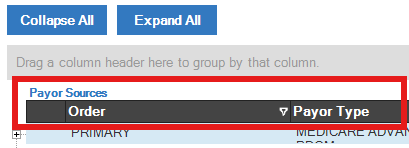
- Under the Payor Type column, if any payer is categorized as either MEDICARE or MEDICARE ADVANTAGE the physician must be PECOS-verified and we cannot use that non-PECOS provider. In this case, reach out to the Compliance Manager.
-
NOTE: Referencing the Order column, disregard any payer labeled as INFORMATIONAL ONLY. Only payers listed as PRIMARY, SECONDARY, or TERTIARY are impactful.
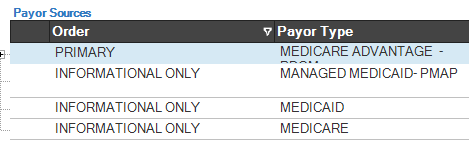
In this example, PECOS is required d/t Medicare Advantage payer. - If none of the payers listed as PRIMARY, SECONDARY, or TERTIARY are a Medicare or Medicare Advantage payer, it is okay to use the non-PECOS provider.
-
Ensure the signing provider name and NPI is printed on the order. The provider’s name must be legible and accompany the signature. Here is an example of a provider’s name and NPI printed clearly in the physician field on page one of the order.
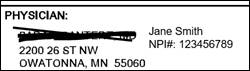
Example - Complete PHYSICIAN CORRECTION- ORDER/OASIS Coordination Note.
- Refer to process C-11-340 Orders Management: Physician Correction-Order/OASIS Coordination Note.
- In the OASIS correction, include a comment listing name of original provider and name of signing provider.
- Complete remaining steps for processing signed orders to attach to HCHB.
📅 Effective: 05.02.2024 | 🛠️ Revised: 08.12.2026 | ✅ Approved: JFJ