
C-19-103 Locate Provider in Medicaid Spreadsheet
👤 RESPONSIBLE POSITION
Medical Records Specialist
🎯 PURPOSE
This instructions give instructions specific to using the Find tool in Excel to search for a specific provider within the Medicaid provider spreadsheet, which includes a large amount of data. By following these steps, the Medical Records Specialist saves time in establishing whether or not a specific provider is located in that spreadsheet.
This process is referenced in C-14-213 Review REQUEST TO ADD NEW PHYSICIAN Coordination Note as part of that larger process.
🔄 PROCESS
- Open the Medicaid provider spreadsheet in Excel.
-
Within the spreadsheet's Home header, select Find & Select, and then click Find.

-
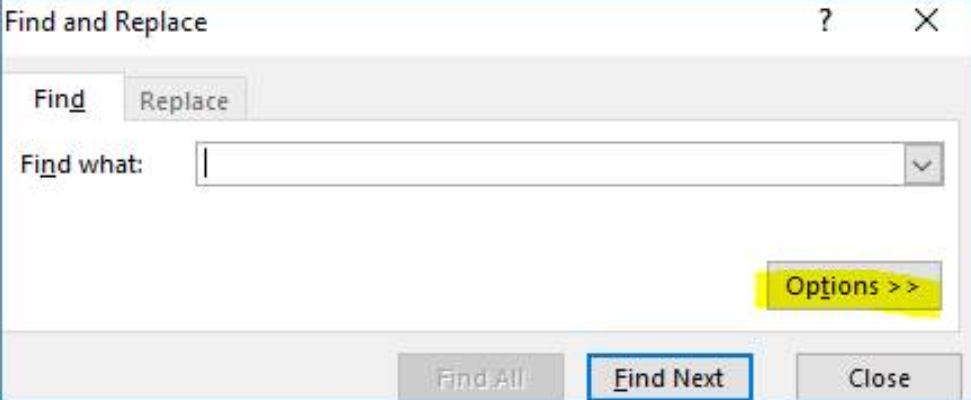
Select Options.
-
Change your settings to match those in the screenshot below.
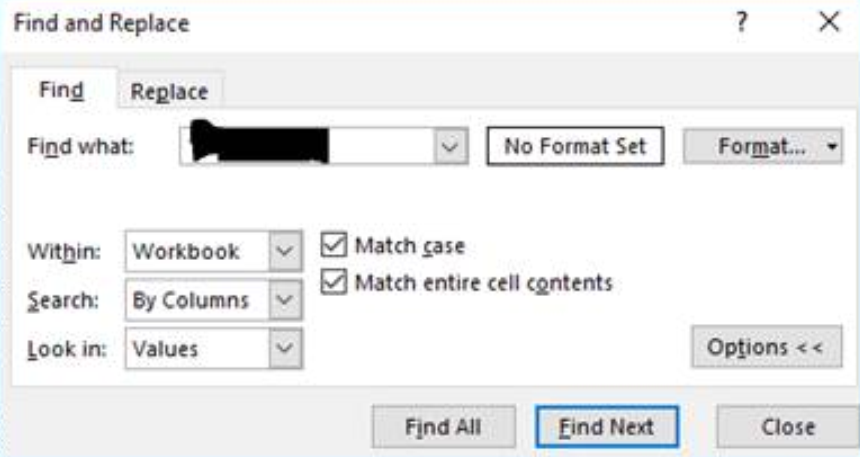
- Then, in the Find what field, enter your basic search data (provider last name, NPI, or other identifier)
- Select Find Next (multiple times if necessary) to navigate to a field within the spreadsheet which contains that search data.
📅 Effective: 07.31.2026 | 🛠️ Revised: N/A | ✅ Approved: JFJ