
C-11-302 Verify Podiatrist Licensure
👤 RESPONSIBLE POSITION
Medical Records Specialist
🎯 PURPOSE
If when following process C-14-213 Review REQUEST TO ADD NEW PHYSICIAN Coordination Note the provider is found to be a Podiatrist, the following steps are needed to confirm that we should proceed with entry of the provider and licensure verification.
Two main factors that affect this process are:
- Per CMS regulations for home health, a podiatrist may only sign orders related to podiatry.
- Verifying licensure for a podiatrist will cost a fee of $50.00 per verification (as of 7/31/2026).
🔄 PROCESS
After receiving a request to add a provider to HCHB, the Medical Records Specialist will identify whether the individual is a podiatrist or not. When the provider is a podiatrist, the Medical Records Specialist must follow these steps:
- Having completed steps 1-5 of process C-14-213, the medical records specialist will email the requestor using the following template.
Subject Line: Request to Add Podiatrist – Confirmation Needed
Your request to add provider (NAME) as an ordering provider for client (NAME) has been reviewed. This individual is a podiatrist and can only be used for orders related to podiatry.
As there is a $50 fee associated with verifying podiatrist’s licensure and there are limits to which orders this provider can sign for home care, please confirm that this provider is necessary to be added for this client. Would you like us to proceed with verifying and entering this podiatrist as a provider in HCHB for this client?
NOTE: If a podiatrist is not an ordering provider but is associated to the client’s care, an alternative to adding them under the physician table in the client referral is to add them as a contact under the demographics tab in the referral.
- The branch will respond to the email.
- If the branch confirms that verification should proceed, continue with step 3.
- If the branch responds that the provider is not needed in the system as a following provider, add a follow-up note to the CC note in HCHB workflow documenting this communication, and mark the note as reviewed, completing the task.
- Identify whether the provider is PECOS-verified via the Order and Referring section of www.data.cms.gov .
- If the provider is PECOS-verified, proceed with step 4 of this process.
- If the provider is not PECOS-verified, complete these steps to identify if we are billing a Medicare payer.
- In HCHB, navigate to the client Referral.
-
Go to the Payor Information tab.

-
In the lower section of this tab, find the columns Order and Payor Type.
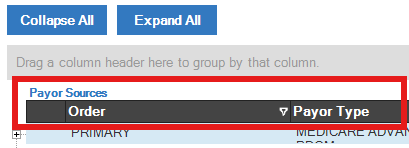
- Under the Payor Type column, if any payer is categorized as either MEDICARE or MEDICARE ADVANTAGE the physician must be PECOS-verified and we cannot use that non-PECOS provider.
-
NOTE: Referencing the Order column, disregard any payer labeled as INFORMATIONAL ONLY. Only payers listed as PRIMARY, SECONDARY, or TERTIARY are impactful.
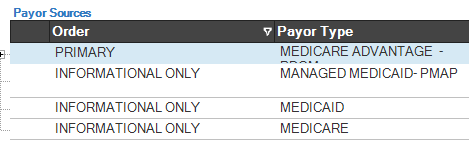
In this example, PECOS is required d/t Medicare Advantage payer.
-
- If none of the payers listed as PRIMARY, SECONDARY, or TERTIARY are a Medicare or Medicare Advantage payer, continue on with step 4.
- If any PRIMARY, SECONDARY, or TERTIARY payer is a Medicare or Medicare Advantage payer, do not proceed.
- Instead, notify the requestor using the template below.
- This provider is not PECOS-verified. As a Medicare payer will be billed for the associated client’s homecare services, this provider cannot be used and will not be entered into HCHB for this client. Please reply back with any questions.
- Additionally, add a follow-up note to the CC note in HCHB workflow documenting this communication, and mark the note as reviewed, completing the task.
- Instead, notify the requestor using the template below.
- Review internal records of DPM licensure verification to identify if the podiatrist has been verified by the team previously.
- This information is held on the T-drive at: 001-Corporate > Medical Records > Podiatrist (DPM) Licensure Verifications
- If licensure is on file, review the expiration date of licensure.
- If there is no licensure verification on file or the verification on file is expired, proceed to step 6.
- If unexpired licensure verification is on file, proceed to step 8.
- If there is no licensure verification on file or the verification on file is expired, email the corporate Business Manager using the following template.
- After receiving the email, the corporate Business Manager will submit the request for licensure verification to the Minnesota Board of Podiatric Medicine, which the board will typically process within 24 hours. When the corporate Business Manager receives the provider verification, they will respond to the medical records specialist’s email with the attached PDF of the verification.
Subject Line: Podiatrist Licensure Verification Needed
The following podiatrist has been requested to be added to HCHB by the branch. Licensure verification on the MN Board of Podiatry is needed before we add this provider to HCHB.
Podiatrist Name:
MN license number (per NPI registry):
Branch:
Client:
- When you receive the licensure verification page, save it to the Podiatry Licensure Verifications folder, located here: 001-Corporate > Medical Records > Podiatrist (DPM) Licensure Verifications
- Follow this naming convention: “Lastname, Firstname DPM YY.MM.DD Licensure Verification”.
- Note that the date in the document name is the date the licensure was verified, not the date of expiration.
- Follow this naming convention: “Lastname, Firstname DPM YY.MM.DD Licensure Verification”.
- Proceed with process C-14-213. When completing the provider setup:
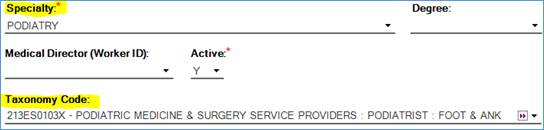
- Ensure that the Specialty field is selected as Podiatry.
- Select a taxonomy code for Podiatrists (referencing the NPI registry for the most specific taxonomy code).
-
Leave the Degree field blank as there is no DPM option.
📅 Effective: 11.05.2024 | 🛠️ Revised: 08.10.2026 | ✅ Approved: JFJ