
C-11-212 Address Request to Add an Out-of-State Provider in HCHB
👤 RESPONSIBLE POSITION | ROLE
Medical Records Specialist
🎯 PURPOSE
This process provides the steps which need to be completed by the Medical Records Specialist to determine whether an out-of-state provider is able to sign home health orders or the Face to Face Encounter (F2F) for a home health client.
Whenever an out-of-state provider is identified, the case must be reviewed individually to determine whether the provider is eligible to be used in the specific situation.
🔄 PROCESS
- When Medical Records Specialist discovers or is notified that the provider is an out-of-state provider (not licensed in Minnesota), they will follow this process.
- Ensure the provider is not licensed in the state of Minnesota as either a physician or qualifying non-physician practitioner.
- If they are licensed in Minnesota, this process does not apply.
- Verify the out-of-state licensure for the provider with that state board. Ensure their license is active and valid.
- Typically, the NPI Registry listing for the provider will give an indication of the provider's state of licensure.
- Verify PECOS status for the provider by completing the following:
- Navigate to the CMS PECOS verification website (data.cms.gov).
-
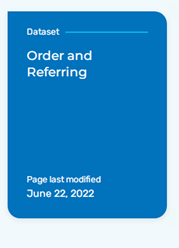
On the CMS website, scroll down and select Order and Referring.
-
Select View Data.

- Enter the physician/NPP's NPI or last name and search. If PECOS is verified for home health agencies, there will be a Y under the HHA column.
- If the physician/NPP is not PECOS-verified (indicated by a N under the HHA column):
- Review the payer selection to ensure a Medicare or Medicare Advantage payer is not set up as PRIMARY, SECONDARY or TERTIARY.
- If there is a Medicare or Medicare Advantage payer set up as PRIMARY, SECONDARY or TERTIARY, notify the branch that the provider is not PECOS-verified. Ask the branch whether they would like to proceed or not (knowing they cannot bill a Medicare payer if they use this provider).
- Verify that the provider is enrolled with Medicaid.
-
Log into the MN-ITS website: https://mn-its.dhs.state.mn.us/gatewayweb/login
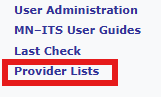
Select Provider Lists from the menu on the left-hand side.
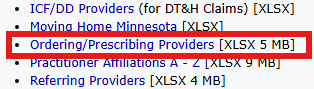
Select the Ordering/Prescribing Providers file.
The list of providers will download to your browser. Select the document from your downloads.
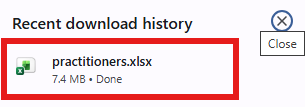
- NOTE: Always access this document from the MN-ITS website to ensure you are referencing current data.
- The provider list will open in a spreadsheet format. Confirm the provider is listed on spreadsheet, which indicates that the provider is enrolled with Medicaid.
- Click here for instructions on using the Find feature within the spreadsheet to easily search for the physician.
- If the provider is not listed in the spreadsheet, the provider is not Medicaid-enrolled. In this case:
- Review the payer selection to ensure a Medicaid or Managed Medicaid payer is not set up as PRIMARY, SECONDARY or TERTIARY.
- If there is a Medicaid or Managed Medicaid payer set up as PRIMARY, SECONDARY or TERTIARY, notify the branch that the provider is not Medicaid-enrolled. Ask the branch whether they would like to proceed or not (knowing they cannot bill a Medicaid payer if they use this provider).
-
- Next, send email communication to the requestor, branch Intake team, Clinical Supervisor and the Clinical Intake Coordinator, using this template below:
- If the Clinical Intake Coordinator is out of office, instead add the Compliance Manager.
TEMPLATE
In the subject line of the email: Request to Add Out-of-State Provider: Client ____ _____
In the body of the email:
Provider _____ _________ is licensed only in the state of ___________. As the provider is not licensed in Minnesota, additional steps are needed to determine whether this provider can be used for this client, ________ ______.
Branch- please reply all including your responses to the questions below, specific to this client.
- Has the appropriate Branch Clinical Team been notified, i.e. Clinical Supervisor (existing client), Area Manager (new referral), etc.?
- What are the ordered services and payer sources for the client?
- Is the provider a VA Provider?
- Is the client receiving services under the VA benefit?
- What is the primary and any secondary payer involved?
- Has the out-of-state provider examined (had a physical visit with) the client in the state he/she is licensed in?
- Did the out-of-state provider write the order in the state they are licensed in?
- Did the out-of-state provider complete the clinical encounter note for the F2F?
- What is the long term plan for home care orders?
- Does the out-of-state provider plan to follow the client’s plan of care from out-of-state or hand off the care of the client to another provider within the state of MN?
- If the provider is handing over care, when is the visit with the MN provider scheduled for?
- Next, in HCHB, update the Follow-Up section of the REQUEST TO ADD A NEW PHYSICIAN coordination note, stating that the process to evaluate the out of state provider has been initiated and an email sent to the branch.
- The branch location will obtain all necessary information and reply back to the Request to Add Out of State Provider e-mail with responses to the above items for approval. The Clinical Intake Coordinator (or Compliance Manager) must be included on the response.
- The Clinical Intake Coordinator (or Compliance Manager in their absence) will determine whether the out-of-state provider can be used in this case, which is specific to the client, following C-11-917 Evaluate Out-of-State Provider Requests. They will then respond back to the Branch location and Medical Records Specialist with the final determination and guidance moving forward.
- If approved, complete C-14-213 Review Request to Add New Physician and enter provider into HCHB.
- In HCHB, in the provider's information, identify the provider as being licensed out-of-state by adding the physician group Out of State License to the provider's information, overriding the physician group specific to the clinic group (e.g. Allina).
- After completion of all previous steps, notify the following individuals:
- Compliance Manager, who will add the specific provider and client information into a tracking system
- Medical Records Specialist who is assigned to adding provider group tags in Mosai, who will identify the provider as being licensed out-of-state in Mosai by adding the directory tag Out of State License to the directory.
📅 Effective: 03.25.2024 | 🛠️ Revised: 08.24.2026 | ✅ Approved: JFJ